Showing posts with label Canon. Show all posts

Thursday, 19 April 2012

Canon Puts 5D Mark III Shipments on Hold As It Investigates Light Leak Issue

Canon Puts 5D Mark III Shipments on Hold As It Investigates Light Leak Issue
Michael Zhang · Apr 18, 2012

Canon has begun informing retailers in the UK and Canada (and probably other regions as well) that shipments of the Canon 5D Mark III have been put on hold as the company investigates the “light leak” issue that has come to light over the past month. Widely discussed in the blogosphere and on forums, the issue — which some have dubbed “leakgate” — is now known to cause a 1/3 stop error in exposure in very specific situations (i.e. scenarios that will not affect the vast majority of photographers).


(via Canon Watch)

Tuesday, 17 April 2012

How to shoot around the 5D Mark III’s limitations

How to shoot around the 5D Mark III’s limitations
Tuesday, 27 March, 2012 03:33
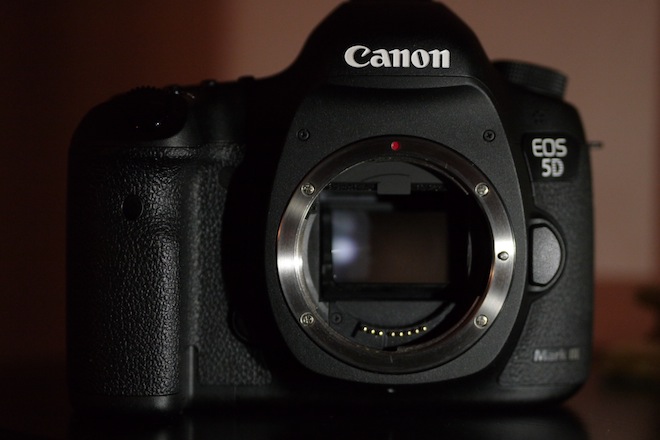
5D Mark III

Here’s a quick guide to the things I’ve found useful with my 5D Mark III video shoots so far.
Picture profile recommendations
I don’t like to use a very flat image profile. I prefer to monitor an image whilst shooting which is representative of what I’m seeing. I also dislike the crushed tonal range that an extended dynamic range image profile like CineStyle produces and the increase in noise it entails – not to mention the hassle of grading it! For satisfying footage straight off the card I recommend Faithful – a typically warm Canon look with saturated colours. Keep sharpness at 0, off. This is far left not the mid point like the other attributes.
Don’t bother reducing contrast or saturation to a minimum as it will bake a crappy look into your image. With contrast and saturation at the mid point the codec grades better in either direction. Increasing saturation in post when it has been recorded at a minimum in camera gives you less colour data to work with. Reducing contrast too much makes low contrast detail muddy looking. Leave the colour tone setting at 0 (mid-point) since adjusting this gives you an ugly green or magenta cast to whites and lighter colour shades.
Sharpen in post not in-camera
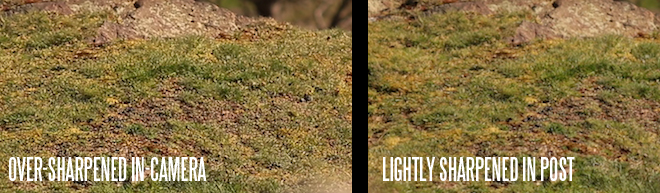
The in-camera sharpening is pretty ugly. Turn it off and use the Unsharp Mask in your NLE instead, which throws more flexibility and horsepower at the job of sharpening. Some scenes will sharpen better than others, be selective and judge each shot as it comes and the amounting of sharpening needed to make it pop. Judge sharpness on a moving image, not a still frame grab. Spatial resolution goes up with motion and what looks either too sharp or not sharp enough on a paused frame can change when it moves.
5D Mark III sharpening
Avoid a very deep depth of field
The 5D Mark III like the other Canon DSLRs is not great at deep depth of field because of the softness of the image. Using a shallower depth of field and a medium-close up to frame your subject helps the perceived level of detail jump right up. The camera can look as sharp as the GH2 given the right composition and sharpening in post.
Turn off noise reduction
The in-camera noise reduction softens your image in low light and reduces the amount of film like fine grain in the image. Since the 5D Mark III already produces a very soft image, a fine grain pattern helps to give a perceived resolution boost. You might even consider adding fine grain afterwards with a plugin in post. One of the best features of the Canon C300 and Panasonic GH2 is the fine noise grain at high ISOs. Turning off noise reduction doesn’t make much difference in how clean your image is in low light but it does reduce the amount of blotchiness and smearing of fine detail.
Use manual white balance
Canon seem to have tamed the auto-white balance after years of complaints that it was too warm. I enjoyed the warmness as I felt it was closer to what my eyes saw and closer to memory colour, despite not strictly being ‘white balanced’ in a technical sense. Now I find that I have to disable auto-white balance and select either a preset of the kelvin setting manually. Test first – check the image carefully in post and make sure your external monitor matches the final footage. Set the monitor or camera up alongside your NLE and compare the images.
Magic hour
Select the best recording format
Use 1080/25/24p in ALL-I mode. IPB isn’t worth bothering with as the compression is too high. Since the 5D Mark III is already resolution challenged, forget 720/60p unless you absolutely need to record very fast moving scenes in slow motion. Twixtor works superbly on 24p otherwise.
Export to a high bitrate for Vimeo and YouTube
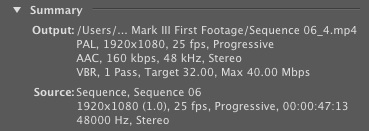
I use a VBR 1 pass H.264 codec in Premiere Pro CS5.5 to export my videos to Vimeo. Bitrate is on the high side for the web – an average of 32Mbit and a maximum of 40Mbit. The screen grab below shows my settings but ignore the part about 25 fps if you’re shooting 24p in NTSC land. Also select the option in Vimeo’s clip settings to stream your video in 1080p, rather than the default SD or 720p.
5D Mark III - Vimeo compression in Premiere Pro CS5.5
Use moire to focus with
The live view display scales the image to roughly VGA 640×480 and such is the extreme downsampling that some moire and aliasing is still visible on the live view display. This helps manual focus, making the focus plane rougher and more animated.
Re-assign the magnified focus assist
The amount of functionality than can be programmed to each programmable button on the 5D Mark III is quite limited but thankfully the ‘punch-in’ to focus can be assigned to SET. This means it is under your right thumb, rather than somewhere near your left hand!
Use a monitor instead of the built in LCD
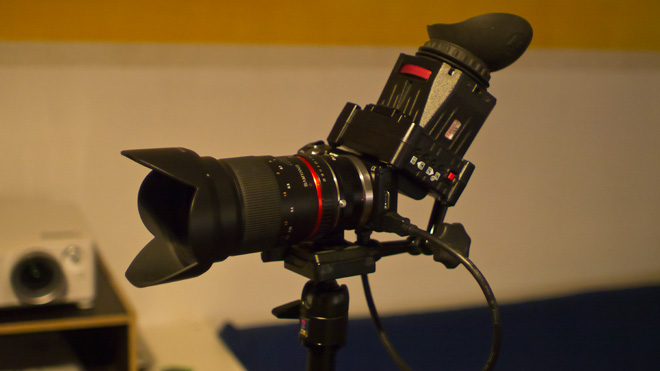
Shooting with a screen that cannot be angled upwards when the camera is on a tripod is a pain. The LCD also does not have great visibility in bright daylight. If you don’t mind the added bulk, use an HDMI monitor or one that double as both an EVF or small monitor like the Zacuto EVF. Invest in good rigging to attach the monitor to the camera, as this will affect its usability.
NEX 5N and Zacuto EVF
Above: my Sony NEX 5N rig with Zacuto EVF. A similar setup can be performed with the 5D Mark III for an articulated monitor or viewfinder
Assign the movie start/stop button to the shutter release
Many will find this more convenient. If you don’t plan to shoot stills almost simultaneously with video, go to the SHOOT5: Movie menu and assign the Movie Shoot Button to both the normal start/stop button and the shutter. To take stills you have to flick the lever on the live view button to enter stills mode. You can by the way take stills in the middle of a recording, but beware that the clip will pause for a second or two when the shutter is released.
Turn off automatic LCD brightness
Set this to manual for more accurate judgement of shot exposure using the LCD. It is hell with it turned on and it will affect your footage.
Turn off auto lighting optimiser
This can override manual exposure if enabled, causing unexpected changes in the middle of a shot!
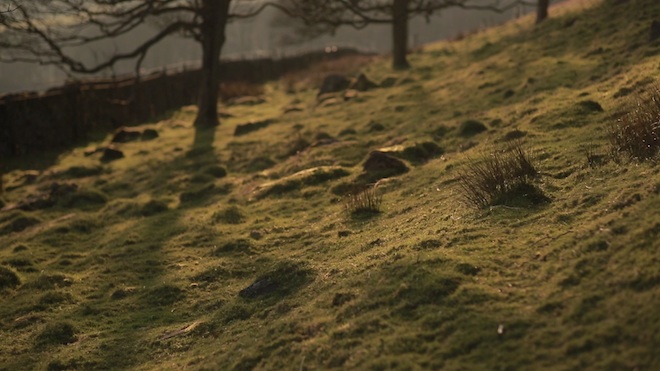
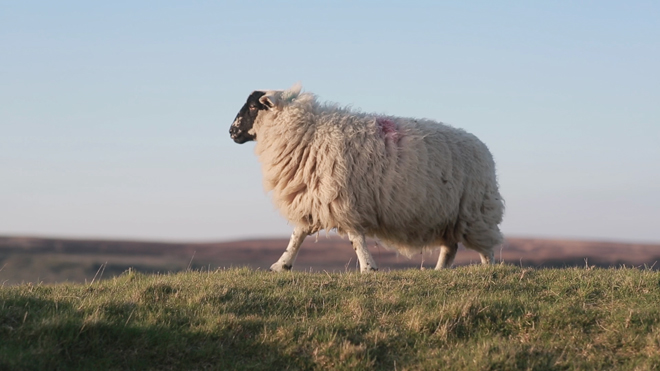
5D Mark III - sheep
Remove the viewfinder cup
The viewfinder cup which comes with the camera in a small plastic bag is simply terrible. When attached it wobbles. The last thing you want is the sound of a wobbling piece of plastic being picked up by your mic.
Stop down the lens
Depth of field control is pretty critical on a full frame sensor. Not every backdrop is better blurred out completely. Show restraint and not only will it be easier to get your subject continuously in focus but an attractive surrounding won’t look like a blank canvas.
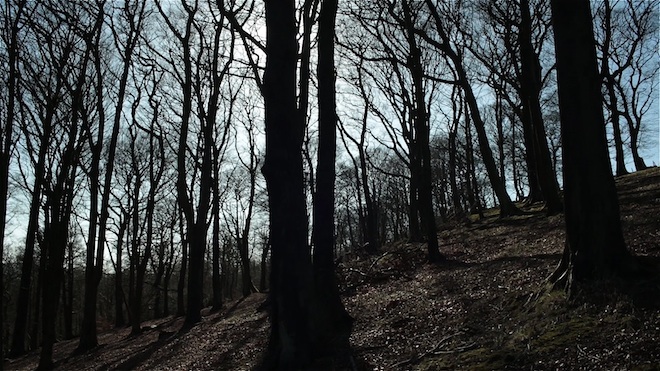
5D Mark III in the woods
Have a GH2 or FS100 as a second body
It is financially viable, the Panasonic GH2 and Sony FS100 compliment the 5D Mark III very well. A larger range of lenses can be adapted. They have more manageable focus when the lens is wide open at F2 or F1.4 in low light. They have articulated monitors. The FS100 has slow mo in 1080p and peaking for manual focus. They both resolve more detail in landscape shots especially at infinity focus. I won’t detail all the advantages here but check back for a full run-down of the FS100 versus GH2 and 5D Mark III later next week.
Consider what the 5D Mark II was capable of in the right hands
Some superb looking stuff was shot on the predecessor. The 5D Mark III is even better. Yes it is a disappointment in many ways and should have been far better. But remember it is full frame – that look is special – great in low light, great at rendering your photographic lenses, a superb sensor in a body with great ergonomics and a diminutive size. Moire and aliasing is pretty much fixed. Audio is much improved. The codec is intra-frame and at a higher bitrate than on the Nikon D800′s internal codec. Frustration aside it is still pretty unique.


Source: EOSHD.com
Earn Money.....Short You URLs....
http://adfoc.us/

Canon Announces New 60Da for Astrophotography, Canon 60Da, 60Da, DSLR camera, Astronomers, Canon, effective megapixel,

Canon Announces New 60Da for Astrophotography, Canon 60Da, 60Da, DSLR camera, Astronomers, Canon, effective megapixel,

[News] Canon Announces New 60Da for Astrophotography!

In the age of cutting back and serving the mass consumer, seemingly little has been done to cater to smaller, more precisely defined markets. But Canon’s new 60Da announced today marks an exception. The camera, now available for pre-order on BHPhotoVideo or Adorama, is Canon’s first since 2005′s 20Da to be specifically suited for astrophotography with increased infra-red sensitivity to better and more accurately capture the colors of the celestial sky. Find more info and photos as they unfold after the jump!
The Canon 60Da features an 18MP APS-C sensor, 1080p video recording at 30fps, and can be paired with an optional time-lapse remote. It even comes supplied with an AC adapter for long periods of continuous shooting! What’s not to love for you astronomers out there?


Source: http://fstoppers.com/news-canon-announces-new-60da-for-astrophotography

Canon developing digital cinema camera for 4K video capture

Canon developing digital cinema camera for 4K video capture

Canon developing digital cinema camera for 4K video capture
April 13, 2012
Canon Inc.
TOKYO, April 13, 2012—Canon Inc. announced today the company is developing a new digital cinema camera capable of recording 4K-resolution video in response to growing expectations for higher levels of imaging performance. Targeting Hollywood and the broader motion picture and television production industry, the interchangeable-lens EOS C500/EOS C500 PL will support 4K (4,096 x 2,160 pixels) video capture with RAW output to ensure the utmost in image quality.

In January this year Canon released the EOS C300 digital cinema camera, part of the company's Cinema EOS System, which was introduced in November 2011, marking Canon's full-fledged entry into the motion-picture production market. Highly acclaimed by professionals in the industry, thecamera realizes not only exceptional video quality performance, but also outstanding mobility, durability and expandability.

Professionals in the high-resolution production market have growing expectations for filmmaking tools offering even higher levels of video imagequality. In response, Canon is moving forward with the development of a new interchangeable-lens digital cinema camera, available in two models: the EOS C500, which supports Canon's diverse lineup of interchangeable EF lenses and EF Cinema Lenses; and the EOS C500 PL, with a PL lens mount for compatibility with industry-standard PL lenses. Supporting 4K-resolution video capture and RAW data output, the EOS C500/EOS C500 PL will achieve exceptional video results without loss in quality. In addition, the digital cinema camera will newly employ a 12-bit RGB 4:4:4 signal during 2K (2,048 x 1,080 pixels) video output, delivering rich color expression and high compatibility with such image processes as chroma key compositing. While further details regarding the EOS C500/EOS C500 PL, including specifications and pricing, have yet to be decided, plans call for the digital cinema camera to be launched during 2012.

Canon will be displaying a prototype of the EOS C500/EOS C500 PL digital cinema camera at NAB Show 2012, one of the world's largest events for the video, broadcasting equipment and digital media industries, from April 16 to 19 in Las Vegas, U.S.A.

In addition to targeting a swift launch of the EOS C500/EOS C500 PL, Canon will continue to enhance its Cinema EOS System product lineup, contributing to further expanding the possibilities in visual expression and the development of cinematic culture.


Canon EOS-1D C, the World's First 4K DSLR Camera, Beyond 1080p: Canon Unveils $15,000 Camera with 4K HD Video

Canon EOS-1D C, the World's First 4K DSLR Camera, Beyond 1080p: Canon Unveils $15,000 Camera with 4K HD Video

canon-eos-1d-c-600Beyond 1080p: Canon Unveils $15,000 Camera with 4K HD Video
by Peter Pachal on Mashable

Canon has a message for everyone in pro video: 1080p is over.

The next big thing is 4K, a video format that pumps up the number of pixels to 4,096 x 2,160 — or more than four times as many as in 1080p — andCanon has just announced a truckload of equipment that hits this next milestone in digital video. The centerpiece: a DSLR camera that shoots in 4K.

The Canon EOS-1D C, a variant of the current flagship 1D X, is the monster camera that can capture video in 4K.

The camera’s full-frame CMOS sensor records 4K video at 24 frames per second. It can also record regular 1080p at either 24 or 60 fps. Canon says the EOS-1D C will arrive in 2012 and cost a whopping $15,000 (by comparison, the 1D X is $6,800).

Besides the EOS-1D, Canon also said it was developing two “digital cinematography” video cameras for shooting 4K — the EOS C500 and C500 PL— and those will be capable of capturing 4,096 x 2,160 footage at 60 fps. Canon is only at the prototype stage on these, and it predicts a list price of about $30,000 on the new cams.

And of course, what good is 4K resolution if you have nothing to display it on (besides that Sony projector we saw at CES)? Canon also unveiled a prototype of a 30-inch 4K monitor for industrial applications. No pricing on that yet, but Canon says it’ll have more to say about it before the end of the year.

Clearly, Canon wants a piece of the digital-filmmaker market that’s up till now been largely dominated by the versatile RED cameras. RED has offered cameras that shoot 4K resolution for some time — and at price points accessible by small companies as well as studios.

The star of Canon 4K sideshow is clearly the EOS-1D C camera, since it brings 4K to the DSLR arena for the first time — even at an exorbitant price. It captures 4K video straight to a CompactFlash card, and the included software is said to ensure “no loss of quality” when viewing 4K footage on an external monitor. Plus you get all the bells and whistles of the EOS-1D X.

It should be noted that 4K, while an exciting technology for digital cinema, has little value to the home-video experience as it exists today. At typical viewing distances, today’s big-screen TVs are already “retina displays” — meaning that the addition of more pixels makes no difference to the human eye.

Adding 4K to the mix won’t make a perceivable difference, unless you are sitting close enough to earn a rebuke from your mother.

What do you think of Canon’s 4K binge? Share your high-resolution thoughts in the comments.

Canon EOS-1D C, the World's First 4K DSLR Camera
The Canon EOS-1D C camera can capture 4K video (4,096 x 2,160) at 24 fps. It's based on Canon's flagship, the 1D X.

EOS-1D C, Front View

EOS-1D C, Back View

EOS-1D C With a Cinema Lens, Front View

EOS-1D C With a Cinema Lens, Side View

EOS-1D C With a Cinema Lens, Top View

Cinema Lens, Alternate View

EOS-1D C, Top View

EOS-1D C, Bottom View

EOS-1D C, Front Angle View

Canon EOS C500 Video Camera
Canon is also developing dedicated video cameras that record in the 4K format, which will be able to capture 4K footage at up to 60 fps.

EOS C500, With Boom

EOS C500, Back View

EOS C500, Back Angle With Boom

EOS C500, Alternate Angle

EOS C500, Side View

EOS C500, Alternate Side

EOS C500, Side View With Boom


Source; Mashable.com